

Tenels Logistics logo

Tenels Logistics

Courier staff console · by Tenels

Run your own courier network from one console.

The staff console for a courier that carries parcels with its own pickup staff, hubs and riders. See the whole day, plan rider runs, deal with problem parcels and keep every taka of cash accounted for.

  • Own riders and hubs
  • Every decision has a name
  • One staff console
Staff console · Overview
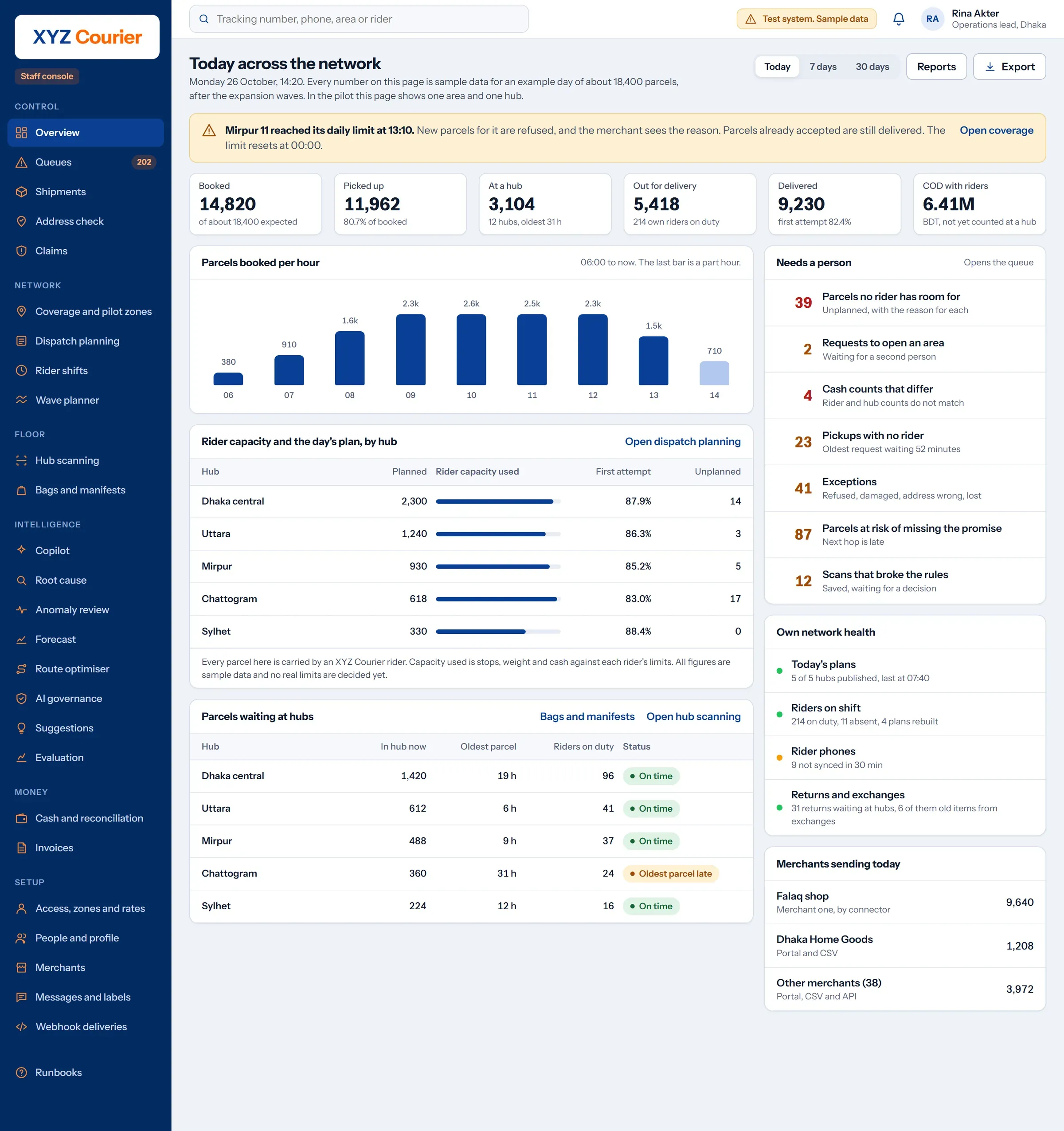
The control tower of the staff console: parcel counts, parcels booked per hour, hub capacity and a list of items that need a person
5
work queues for parcels that need a person
5
steps cash moves through, always one way
2
people needed for the sensitive actions
0
outside couriers: its own staff, hubs and riders

Who works in it

One console for the whole floor.

Dispatchers, hub staff, support, finance and managers all work from the same records, each with their own permissions.

  • Dispatchers

    Build each hub’s plan for the day and publish it to the riders’ phones.

  • Hub staff

    Receive, sort, dispatch and bag parcels by scanning them.

  • Support

    Work through refused, damaged and missing parcels.

  • Finance

    Follow cash from the rider’s hand to the merchant’s payout.

  • Managers

    See the whole network, and choose which areas take parcels.

One parcel, one rupee trail

Follow the parcel. Then follow the money.

Every handover is a record with a name on it. Cash moves in one direction only, and nothing edits an earlier record: a correction is a new entry that points at the old one.

The parcel

  1. 1 Booked The merchant books the parcel.
  2. 2 Picked up By the courier’s own pickup staff.
  3. 3 At a hub Received, sorted and bagged by scan.
  4. 4 Out for delivery On a rider’s run from the published plan.
  5. 5 Delivered With proof of delivery on the record.

The cash

  1. 1 Delivered The rider collects the cash on delivery.
  2. 2 With the rider Shown on the control tower until it is counted.
  3. 3 Counted at the hub Day-end closes show matches and shortfalls.
  4. 4 Banked A deposit slip for what was counted.
  5. 5 Paid to the merchant In a payout run, with a numbered invoice.

The console, screen by screen

Eight screens. Open any one full size.

These are the real screens of the console. Select a screen to read it in full.

  • 01 · The whole day on one page

    Control tower

    Parcels booked, picked up, at hubs, out for delivery and delivered. Cash still with riders, bookings by hour, and how loaded each hub is. A banner appears the moment an area hits its daily limit, and counts of items that need a person link straight to the work.

    • Booked to delivered
    • Hub load
    • Daily-limit banner
  • 02 · Choose where parcels are taken

    Coverage and pilot zones

    Each area has a status, a hub, a daily limit and a same-day cut-off. Opening an area needs a second person to approve. Pausing one takes one person and works at once. A table of refusal reasons shows where demand is turned away, so the next area is chosen from real numbers.

    • Second person to open
    • Refusal reasons
    • Try an address
  • 03 · Plan the run before riders leave

    Dispatch planning

    A draft plan for each hub. Every rider’s stops, weight and cash in hand are shown against their limits. Parcels no rider has room for are listed with the reason and a suggested fix. Nothing reaches rider phones until a dispatcher publishes the plan.

    • Rider load vs limits
    • Unplanned list
    • Publish to riders
  • 04 · Problems, in order of waiting time

    Queues that need a person

    Five queues: exceptions, pickups with no rider, parcels at risk of missing their promise, unplanned parcels, and scans that broke a rule. Each row shows how long it has waited and the next step, and a side panel gives the details and the actions.

    • Five queues
    • Next step per row
    • Side panel
  • 05 · The full story of one parcel

    Shipment detail

    The timeline, who held it and when, why this rider was chosen, each delivery try, the money, proof of delivery and every change staff made. It also shows exchanges, where a rider hands over a new item and collects the old one.

    • Timeline
    • Who held it
    • Proof of delivery
  • 06 · Scan in, scan out, nothing slips

    Hub scanning

    Receive, sort, dispatch and bag by scanning. A repeat scan is counted once. A parcel for another hub, a parcel on hold and an unknown code are stopped and sent for review. A bag cannot be sealed with a gap unless a supervisor approves it with a note.

    • Repeat scan counted once
    • Odd scans stopped
    • No sealing with a gap
  • 07 · Every taka accounted for

    Cash and reconciliation

    Cash moves in one direction: delivered, with the rider, counted at the hub, banked, then paid to the merchant. Each step is its own record with a name on it. Day-end rider closes show matches and shortfalls. A correction is a new entry that points at the old one, never an edit.

    • One direction
    • Rider day-end closes
    • Corrections, not edits
  • 08 · Who can do what, and where

    Access, zones and rates

    A plain table of what each role can do and where, the staff list and their hubs, the actions that need two people, rates, zones and hubs, and a history of every change.

    • Role table
    • Two-person actions
    • Change history

Built so people can trust the numbers

What it always does, and what it never will.

Every decision is saved with a name and a reason. The rules are in the system, not in somebody’s memory.

The console always

  • Saves every decision with a name and a reason.
  • Asks a second person before a new area opens or a cash difference changes.
  • Counts a repeat scan once.
  • Stops a parcel for another hub, a parcel on hold and an unknown code, and sends them for review.
  • Fixes a mistake with a new entry that points at the old one.
  • Numbers merchant invoices without gaps.

The console never

  • Sends a plan to rider phones before a dispatcher publishes it.
  • Seals a bag with a gap unless a supervisor approves it with a note.
  • Edits an issued invoice. A credit note, approved by a second person, fixes it.
  • Edits a cash record in place.
  • Hands a parcel to another courier company.
  • Lets an AI helper assign, reroute, cancel, change a status or touch money.

Proposed, not live

Helpers that explain and suggest. People decide.

An optional set of AI helpers is designed into the console. They can only advise: they cannot assign, reroute, cancel, change a status or touch money. Every screen keeps working when AI is off.

  • CopilotAnswers questions about today, with the records it used and a check that its numbers match them.
  • Root causeExplains the likely causes of an exception.
  • Anomaly reviewFlags unusual cash or scans for a person to review.
  • ForecastEstimates the parcels and riders needed.
  • Route optimiserCompares a computer-built dispatch draft with the standard one.
  • AI governanceShows each helper’s status and can switch any of them off at once.

These are proposals. Whether they help is for a controlled pilot to show.

Also in the console

And the rest of the back office.

  • Rider shifts
  • Wave planner for opening new areas
  • Bags and manifests
  • Address check
  • Claims
  • Merchant list
  • Merchant invoices, as PDF or CSV
  • People and profile
  • Message templates and labels
  • Webhook deliveries for merchant systems

How it rolls out

Built to start small and grow.

  • 01

    Starts small

    In a pilot the control tower shows one area and one hub, and grows from there.

  • 02

    Approvals built in

    More areas open as the numbers support them, each with a second person’s approval.

  • 03

    Companion apps are separate

    The merchant portal and the rider and hub phone app are separate products. This page covers the staff console only.

See your whole day at a glance.

Tell us how your parcels move today. We will walk you through the console and show where your hubs, riders and cash would fit.

Control tower

The control tower: counts of booked, picked up, at hub, out for delivery and delivered parcels, a bar chart of parcels booked per hour, hub capacity and a list of items that need a person

Coverage and pilot zones

The coverage screen with open, paused and waiting areas, daily limits, a requests-to-open panel and refusal reasons

Dispatch planning

The dispatch planning screen with riders and their load, summary counts and a list of parcels no rider has room for

Queues that need a person

The exceptions queue with a table of parcels, how long each has waited, and a side panel with a suggested next step

Shipment detail

A shipment detail screen with a timeline of events, merchant and receiver details, the money for the parcel and who held it

Hub scanning

The hub scanning screen with scan modes, a large scan box, latest scans with results, and an open bag with two missing parcels

Cash and reconciliation

The cash and reconciliation screen with cash totals, rider day-end closes showing matches and shortfalls, and a merchant payout run

Access, zones and rates

The roles and people table showing what each role can do, with the actions that need two people marked

Control tower copilot

The control tower copilot: questions answered with sources, ranked suggestions and what people decided