Tenels HRM HR and attendance · by Tenels

People, time, leave and pay in one place.

A multi-company HR and attendance platform where employees, managers and HR admins handle people, time, leave, pay and approvals together. Every role sees its own home, menu and answers.

  • Light and dark
  • Desktop and phone
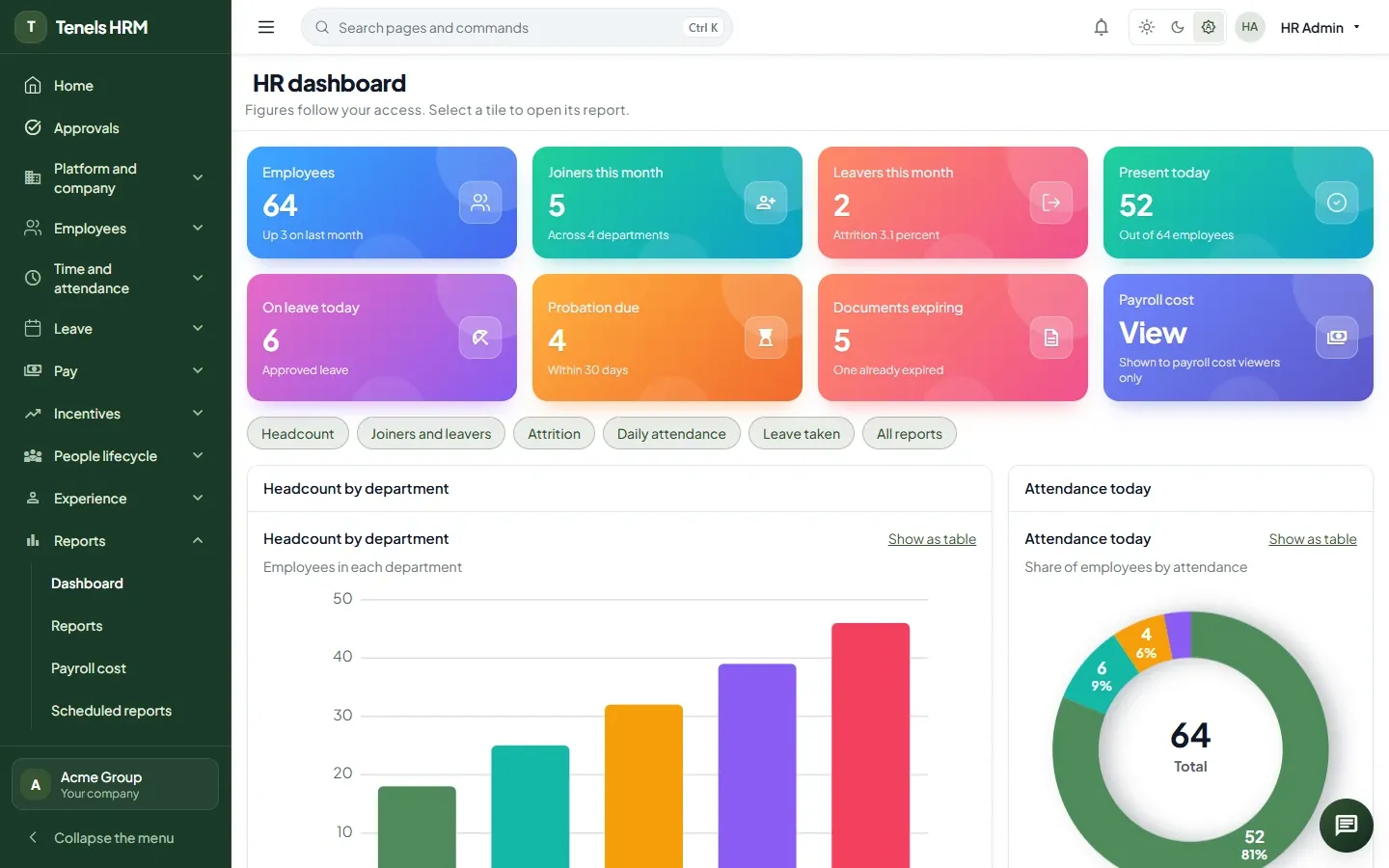
The HR dashboard: coloured tiles for employees, joiners, leavers, present today, on leave, probation due and documents expiring, with a headcount bar chart and an attendance doughnut
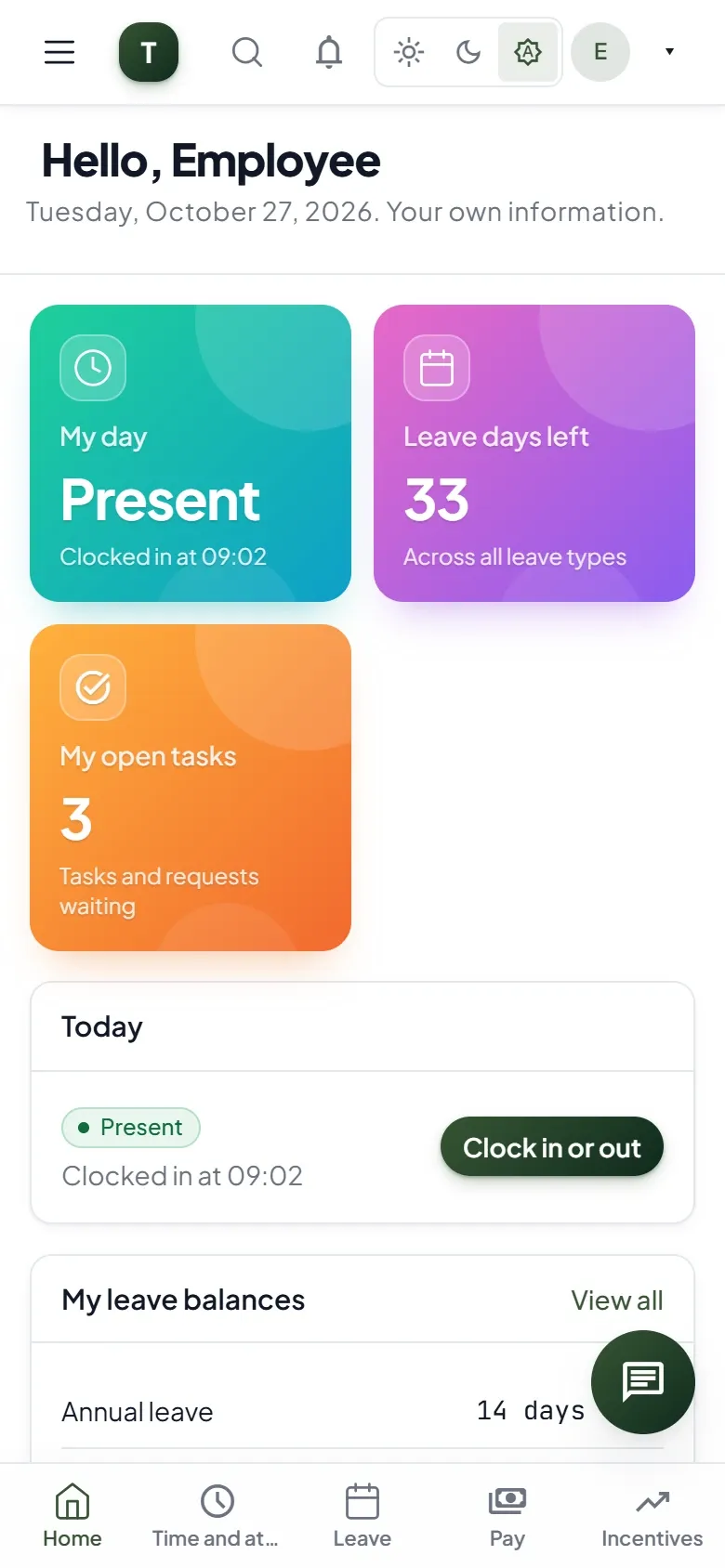
The employee home on a phone: my day, leave days left, open tasks and a clock in or out button

One system, four homes

Everyone lands on their own home.

The menu, the pages and even the answers of the built-in assistant follow what each person is allowed to do.

  • Employee

    A simple self-service home: your own leave, attendance and payslips.

  • Manager

    Your team, and the requests waiting for your decision.

  • HR admin

    The whole company: people, time, leave, pay and approvals.

  • Platform operator

    The health of the service itself.

One request, five places

Follow one leave request all the way through.

The same request moves from the employee to the manager, into attendance and payroll, and into the audit trail. Select a step. The screens are the HR admin’s view.

Step 1 of 5 · Leave requests

An employee asks for leave from their own home. The form counts the days and warns about short notice, and the request joins the list as Pending.

Step 2 of 5 · Approvals inbox

The request lands in the approvals inbox for the manager. Approval chains and delegation are built in, and every decision keeps its trail.

Step 3 of 5 · Attendance today

Approved leave appears in the day’s attendance as On leave, next to who is present, late or missing a punch.

Step 4 of 5 · Pay runs

Then the month’s pay run: open, in review, locked and paid, or reopened if something has to change.

Step 5 of 5 · Audit trail

Every step is recorded: who did what, to whom, and when. Sensitive values stay masked unless someone reveals them, and that is logged too.

What is in it

Sixteen areas of HR, one login.

From the employee record to payroll, hiring and reports. Pick a group to narrow it down.

  • Employee directory and profiles

    Search and filter everyone by status, department, title and join date. Invite people or import them in bulk.

    People
  • Organisation and org chart

    Departments, designations, grades and locations, and a live chart that flags a missing department head.

    People
  • People lifecycle

    Probation reviews, transfers and promotions, letters and certificates, offboarding and exit clearance.

    People
  • Employee experience

    Announcements with acknowledgement tracking, policies, a helpdesk with response timers, assets and self-service.

    People
  • Leave management

    Requests, balances, a team calendar, policies, accrual, carry-forward and year-end runs.

    Time and leave
  • Attendance and time

    Daily attendance, punches, shifts and rosters, holidays, overtime, regularisation of missed punches, field visits and month close.

    Time and leave
  • Approvals inbox

    Leave, overtime and correction requests in one place, with approval chains, delegation and a full trail.

    Time and leave
  • Payroll

    Monthly pay runs, payslips, bonuses, increments, loans, deductions, claims and settlements.

    Pay and rewards
  • Incentives and commission

    Sales teams, plans, targets, commission runs, statements and disputes, with shop-sync connections.

    Pay and rewards
  • Recruitment and onboarding

    Requisitions and postings, a candidate pipeline with interviews and offers, then checklists for new joiners.

    Hiring and growth
  • Performance and training

    Review cycles with self and manager ratings, goals, courses and sessions, compliance and certifications.

    Hiring and growth
  • Role-based home and dashboards

    Each role lands on its own home. HR sees headcount, joiners, leavers, who is present and expiring documents.

    Insight and control
  • Reports and scheduled delivery

    Headcount, attrition, attendance, leave, overtime, payroll cost and document expiry, delivered on a schedule.

    Insight and control
  • Roles, permissions and audit

    A role editor, users, feature switches, notification settings, imports and an audit trail that masks sensitive values.

    Insight and control
  • Built-in assistant

    A chat helper that answers from local files, by the signed-in role. It is not AI.

    Insight and control
  • Accessible and responsive

    Light and dark themes, keyboard navigation, a Ctrl K command search, and a layout that works on desktop and phone.

    Insight and control

The screens

Thirteen screens, full size.

Real screens of the product, shown as an HR admin sees them. Open any one and move through the rest with the arrow keys.

Built-in assistant · not AI

A helper that knows its place.

Staff can ask about leave, pay and attendance in a chat. It answers from files that ship with the product, and it keeps to what the signed-in person is allowed to see.

  • 119 topics, about 525 records

    It answers from a built-in set of topics and records, so replies are quick and consistent.

  • Answers by the signed-in role

    An employee and an HR admin asking the same question can get different answers.

  • Links only to pages you may open

    It never points someone at a page their role cannot see.

  • No AI model behind it

    Its answers come from the files, not from a language model.

On a phone

The employee’s day, one tap away.

On a phone the menu becomes a tab bar, and an employee lands on a self-service home with their own information only.

  • My dayPresent or not, and when you clocked in.
  • Leave days leftYour balance across all leave types.
  • My open tasksThe tasks and requests waiting on you.
  • Clock in or outOne button on the home screen.
  • Light and dark themes
  • Keyboard navigation
  • Ctrl K command search
The employee home on a phone: hello, the day and date, my day marked present with a clock-in time, leave days left, open tasks, a clock in or out button and a tab bar

Control

Limits are written down. So is every action.

Each role has a stated purpose and a data scope, and the audit trail records who did what, with sensitive values masked. Both lists below are lines from the product’s own screens.

Roles and permissions

  • HR AdminWhole company

    Runs HR for the company. Cannot approve payroll.

  • Team LeadDirect reports

    Sees and approves for direct reports. Never sees pay.

  • EmployeeOnly themselves

    Own profile, attendance, leave and payslips.

  • Payroll OfficerWhole company

    Prepares payroll. Cannot approve them.

From the roles screen.

Audit trail

  • Hasina HR revealed a bank account · Imran Dev

  • Rafi Exec tried to reveal a national ID · Nila Dev

  • Mitu Fin exported the payroll register · October payroll

  • Chief approved payroll · September payroll

  • Hasina HR changed role permissions · Payroll Officer

From the audit trail.

Built to last

A product that fits how you work.

  • 01

    Built for many companies

    The menu has a Platform and company area, so one service can hold more than one company.

  • 02

    Limits are written down

    Each role has a stated purpose and a data scope, and sensitive values are masked in the audit trail.

  • 03

    Desktop and phone

    The same screens work on a desktop and on a phone, in light and dark.

Give your people one place to start.

Tell us how your company handles people, time and pay today. We will walk you through the product and show how each role would use it.